
The Slack action#
contentrules.slack registers one content rule action, Post a message to Slack, named plone.actions.Slack.
The action is available for every triggering event, and for every type of content.
Fields#
Field |
Required |
Default |
Interpolated |
Sent to Slack as |
|---|---|---|---|---|
Webhook url |
Yes |
None |
No |
The URL of the request |
Channel |
Yes |
None |
No |
|
Pretext |
No |
None |
Yes |
|
Title |
Yes |
None |
Yes |
|
Title Link |
No |
|
Yes |
|
Text |
Yes |
None |
Yes |
|
Color |
No |
None |
No |
|
Icon |
No |
None |
No |
|
Username |
Yes |
|
No |
|
Fields |
No |
None |
Values only |
|
Interpolated fields accept string interpolation variables, such as ${title} or ${user_fullname}.
The variables are resolved against the object that triggered the rule.
The Classic UI form of the action lists every available variable.
Leading and trailing whitespace is removed from every interpolated value. A field left empty is sent as an empty string.
- Webhook url
Must be a URL, typically
https://hooks.slack.com/services/….- Color
One of
good,warning,danger, or a hexadecimal color code such as#439FE0.- Icon
An emoji code, such as
:flag-br:.
Important
Slack ignores Channel, Icon, and Username for incoming webhooks created by a Slack app. Those webhooks always post to the channel, and with the name and icon, chosen when the app was installed. Only legacy incoming webhooks honor these three fields.
Fields syntax#
Fields adds a small table to the bottom of the message.
Define one table entry per line, in the format title|value|short.
Title|${title}|True
Review State|${review_state_title}|False
titleThe label of the entry. It is not interpolated.
valueThe content of the entry. It is interpolated.
shortTruedisplays the entry side by side with other short entries. The value is case-insensitive. Any value other thantruecounts asFalse.
A line that does not have exactly three parts, separated by |, is ignored.
Message payload#
The action sends a JSON payload to the webhook, such as the following example.
{
  "attachments": [
    {
      "color": "good",
      "fallback": "Welcome to our friend Sebastião Salgado",
      "title": "Sebastião Salgado just logged in at Site",
      "title_link": "https://www.example.com/",
      "pretext": "User logged in",
      "fields": [
        {
          "title": "User email",
          "value": "salgado@not-really-a-mail.com",
          "short": false
        }
      ]
    }
  ],
  "icon_emoji": ":flag-br:",
  "text": "Welcome to our friend Sebastião Salgado",
  "username": "Plone CMS",
  "channel": "#plone-users"
}
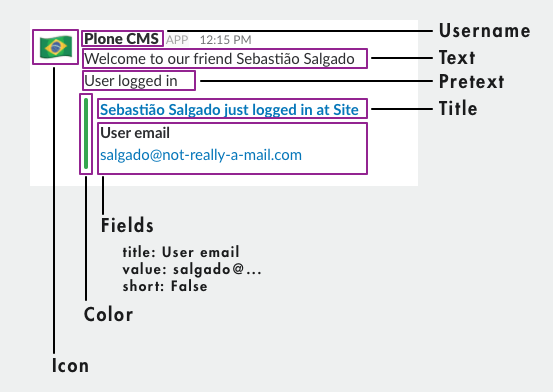
The following image shows where each field appears in the message.
Request#
The action posts the payload with a timeout of 10 seconds, and verifies SSL certificates.
The request runs in the background. The action always reports success to the content rules engine, so the remaining actions of the rule run, whether Slack accepts the message or not. Failures are logged, as described in Logging.