
The provider form#
Every field the Identity providers control panel shows when you add or edit a provider, arranged as the form arranges it.
The form is generated from the driver's published schema, so a site that installs a third-party driver gets that driver's form with no frontend change. Which tabs appear depends on which driver you picked.
Which tabs each driver shows#
The form is composed from three sources, which is why the tab list is longer than the driver's own fieldsets:
the fields every provider has, from
IProviderRecords—the first tab, titled Identity, plus Style;the driver's own fieldsets, the first titled Settings and the rest keeping their own names;
a Mapping tab composed in the frontend, holding the property map and the group map.
Driver |
Tabs |
|---|---|
|
Identity, Style, Settings, Mapping |
|
Identity, Style, Settings, Accounts, Mapping |
|
Identity, Style, Settings, Accounts, Mapping |
|
Identity, Style, Settings, Accounts, Groups, Profile, Mapping |
|
Identity, Style, Settings, Accounts, Groups, Profile, Mapping |
|
Identity, Style, Settings, Accounts, Groups, Profile, Mapping |
A driver that declares no fieldsets gets a single Settings tab, which is what
email gets and what a third-party driver that never declares one gets.
Driver tab ids are namespaced under settings-, because the backend serves a
default fieldset on both halves of this form and two tabs with one id renders
only one of them.
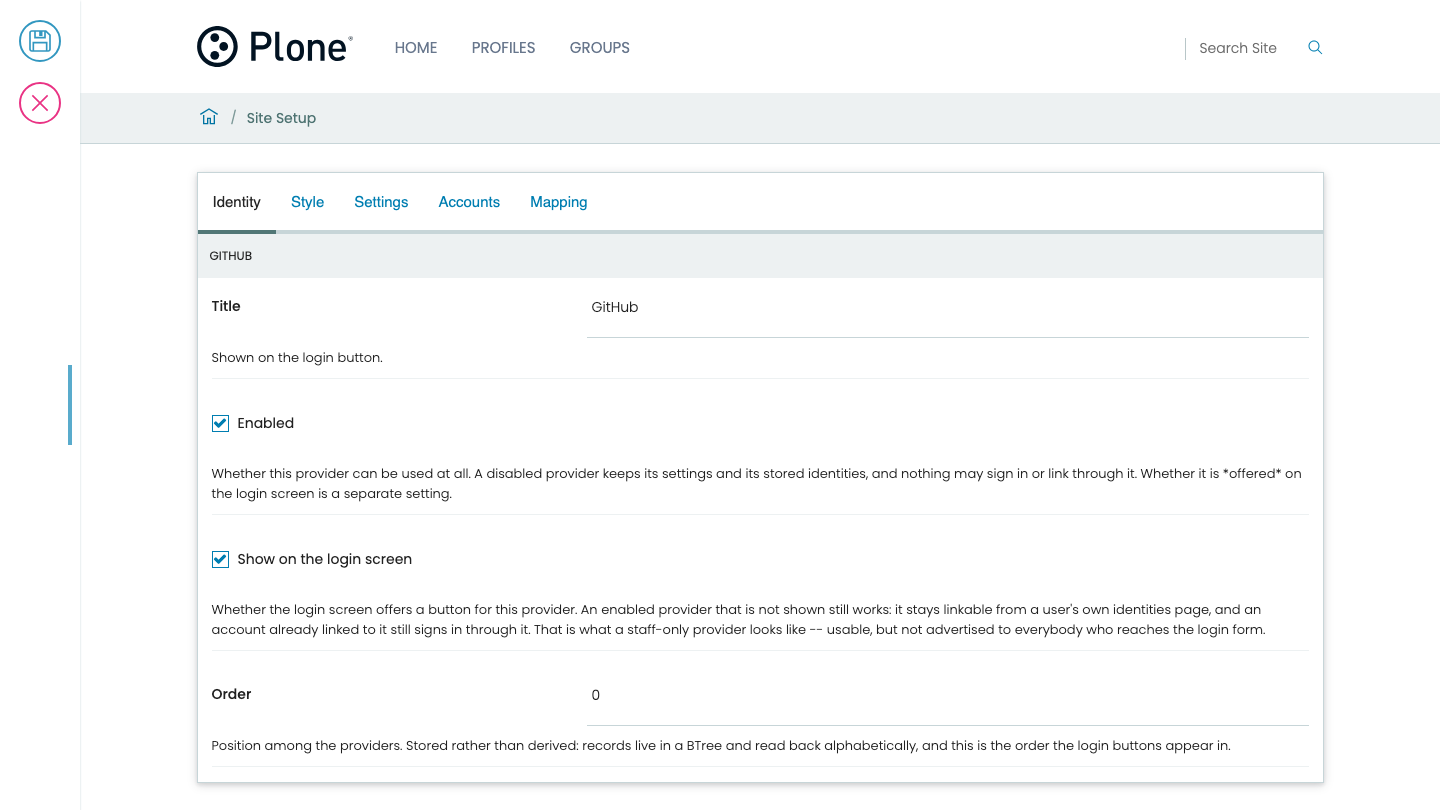
Identity tab#
Shown for every driver. The first thing asked, and when adding a provider it also carries the driver and the provider id.
Field |
Registry key |
Type |
Default |
|---|---|---|---|
Title |
|
|
|
Enabled |
|
|
|
Show on the login screen |
|
|
|
The order the login buttons appear in is not on this form. Dragging a row of
the provider list sets it, and stores order for every provider in one request.
Style tab#
Field |
Registry key |
Type |
Default |
|---|---|---|---|
Icon |
|
|
|
Background colour |
|
|
|
Foreground colour |
|
|
|
None of it changes what the provider does. The icon is sanitized on save—see Threat model.
With no icon uploaded, the login button uses the driver's default icon, and the Icon field shows it. See Shipped drivers.
Mapping tab#
Field |
Registry key |
Type |
Default |
|---|---|---|---|
Property map |
|
|
|
Group map |
|
|
|
Composed in the frontend rather than served as a fieldset. The group map appears only for a driver that has a group claim.
The two columns that name something on the far end are text, and the two that name something on this site are pickers, which is the asymmetry worth knowing:
Column |
Widget |
Why |
|---|---|---|
Claim path |
Text |
Whatever the provider publishes; nothing here can enumerate it. |
Profile field |
Picker |
The fields of the site's user type and its behaviors that a login writes, served as |
Provider group |
Text |
The far end's own group names. |
Local group |
Picker |
The site's groups, served as |
A property map row whose target is anything else is refused—by the API with a 400, and by GenericSetup on import. A group map row naming a group the site does not have is refused by the API with a 400, and stored by GenericSetup with a warning in the log: a profile may ship a map before the step that creates its group. See About profiles and groups for what a login does with both maps.
Settings tab#
The fieldset a driver does not name. How to reach the provider.
Field |
Registry key |
Type |
Drivers |
|---|---|---|---|
Client ID |
|
|
all but |
Client secret |
|
|
all but |
Scope |
|
|
all but |
Issuer |
|
|
|
Token lifetime |
|
|
|
Rate limit per hour |
|
|
|
Leave Scope empty to use the driver's own default. github has no
Issuer, because it is not an OpenID Connect provider.
Accounts tab#
Who the provider's answer makes the person standing here.
Field |
Registry key |
Type |
Default |
|---|---|---|---|
User id source |
|
|
|
Let this provider create accounts |
|
|
on |
Attach to an existing account with the same verified email |
|
|
off |
This provider's email verification counts |
|
|
off, except |
This provider sends verification flags as text |
|
|
off |
Address preference |
|
|
empty |
Shown for every driver except email. Address preference is on the
github form only.
Groups tab#
Field |
Registry key |
Type |
Default |
|---|---|---|---|
Groups arrive in the claim |
|
|
|
Only these groups may sign in |
|
|
empty |
Let this provider set group membership |
|
|
on |
Shown only for keycloak, oidc-generic and plone-identity, the three
drivers whose settings schema is IOIDCSettings or extends it. github, google and email carry no
groups this package can read, so none of them gets this tab.
See Map provider groups.
Profile tab#
Field |
Registry key |
Type |
Default |
|---|---|---|---|
Fetch the picture over HTTP |
|
|
off |
One field, and it still gets a tab rather than trailing after group settings it has nothing to do with.
Actions#
- Test connection
Fetches the provider's discovery document, or validates the static configuration for drivers that have no discovery, and reports what it found. It clears the discovery cache first. It does not sign anybody in, so it says nothing about the client secret, the redirect URI, or the trust switches.
- Delete
Removes the provider's configuration. It does not delete the identities linked through it—those are account data.
The client secret is write-only#
The control panel serializes a stored secret as a mask, never as its value.
To keep the stored secret, save the form with the mask unchanged.
To replace it, type the new one over the mask.
Warning
Do not clear the field to keep the existing secret. Blanking it sends an empty string, which is a different instruction, and it destroys the stored secret.